
You are here:
View Member Profile Widget Template
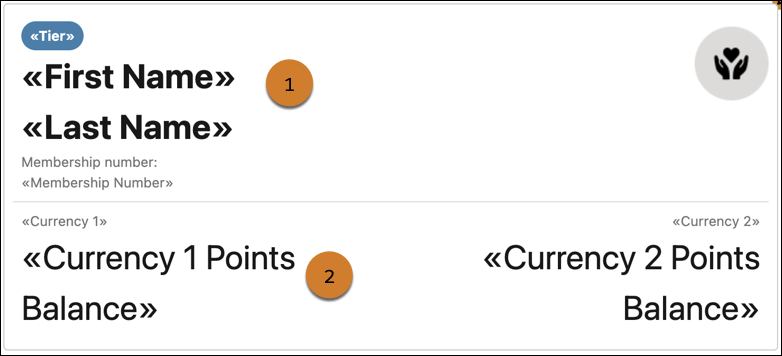
The View Member Profile widget template lets members view their current points balance, their current tier, and their membership number. The widget also consists of a logo that you can replace with your company logo or your loyalty program’s logo.
Required Editions
| Available in: Lightning Experience in Enterprise, Performance, Unlimited, and Developer Editions with Loyalty Management |
Widget Content
The View Member Profile widget has the default state and the error state. You can customize both states.
| State | Section | What You Can Customize |
|---|---|---|
| Default | Background | Consists of the widget’s background. You can add a color or image for the background and change the background’s height and padding. |
| Header (1) | Consists of a background, a pill containing the member’s current tier name, their full name, membership number, and logo. You can customize the background, the padding of the header, the text, and logo in the header. You can also remove any text that you don’t need. | |
| Body (2) | Consists of the names of two currencies and the member’s current point balance for both currencies. You can remove the details of either currency or both currencies and add the details relevant for the members of your loyalty program. | |
| Error | Background | Consists of the widget’s background. You can add a color or image for the background and change the background’s height and padding. |
| Message | Consists of the message that is shown to the members when the widget can’t show any data to the members. You can modify the text for the message. |
In Loyalty Widget Designer, you can also decide the members who can view the widget. You can show the widget to:
- All members
- Members who belong to the tiers that you specify
- Members whose points balance for the currency that you specify isn’t less than the value that you specify
Example for Customizing the Widget in Widget Designer
The loyalty program manager of a company wants to show just the first name of the members and their current points balance in the widget. And the program manager also wants to add the company’s logo and replace the member’s current tier information with the name of the loyalty program. Finally, the message that’s shown in the error state has to be changed.
The program manager switches to the default state of the widget and selects the Header section. In the widget properties, the manager expands Message Text and replaces the merge field for the member’s tier information with the name of the loyalty program. Next, the program manager removes the merge field that contains the member’s last name from Member Name. The program manager then expands Icon and adds the URL to the company’s logo in Background Image URL. Then, the program manager selects the body section, expands Second Currency, and removes the merge fields in Second Currency Name and Second Currency Value.
The program manager then switches to the error state and selects the Message section. The manager expands Message Text and updates the messages that appeared in the error state.
Example for Customizing the Widget in FlexCard Designer
The loyalty program manager of a company wants to show the members’ points balance for only one currency and change the error message for the default state.
The program manager selects default state currency name two and default state currency two value components and deletes them. Then, the program manager expands the error state and selects the error state message and changes the message.
Preview Widget
After customizing the widget, the program manager previews the widget. In preview, here are the values that the program manager provides to a member’s profile.
- Program Name—Enters the name of the loyalty program that the widget is previewed for.
- Membership Number—Enters the membership number of the member that the widget is previewed for.
- Tier Group—Enters the name of the tier group that the member belongs to. This parameter is required and needs a value for preview. If you replace the current tier merge field with another value, the value appears in place of the member’s current tier name in preview.
- Member Currency One—Adds the name of the Loyalty Member Currency for which the member’s points balance is previewed.
- Member Currency Two—Leaves this parameter empty because the program manager removed the second currency from the widget.
