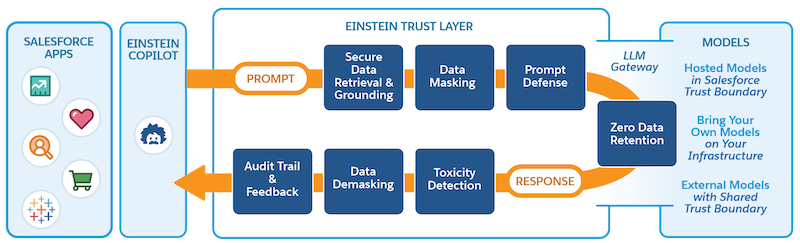
BYOLLM(Bring Your Own Large Language Model)機能を使用すると、外部プラットフォームでホストされる基盤モデルを追加して、Einstein Studio に接続できます。基盤モデルを使用して、生成 AI を強化するモデル設定を作成できます。モデルを本番にリリースする前に、モデル Playground でさまざまな設定を使用してプロンプトに対するモデルの応答を評価します。
必要なエディション
Einstein生成AIはLightning Experienceで使用できます。Einstein 生成 AI の設定は Lightning Experience で使用できます。
使用可能なエディション: Einstein for Sales、Einstein for Platform、または Einstein for Service アドオンが付属する Enterprise Edition、Performance Edition、および Unlimited Edition。Einstein for Sales、Einstein for Platform、またはEinstein for Serviceアドオンを購入する場合は、Salesforceアカウント エグゼクティブにお問い合わせください。
基盤モデルの追加 Einstein Studio で基盤モデルを追加すると、外部モデルプロバイダと Salesforce 間のエンドポイント接続が確立されます。モデルを接続したら、新しいモデル設定を作成し、カスタムプロンプトに対するモデルの応答を評価します。
We use three kinds of cookies on our websites: required, functional, and advertising. You can choose whether functional and advertising cookies apply. Click on the different cookie categories to find out more about each category and to change the default settings.
Privacy Statement
Required Cookies
Always Active
Required cookies are necessary for basic website functionality. Some examples include: session cookies needed to transmit the website, authentication cookies, and security cookies.
Functional Cookies
Functional cookies enhance functions, performance, and services on the website. Some examples include: cookies used to analyze site traffic, cookies used for market research, and cookies used to display advertising that is not directed to a particular individual.
Advertising Cookies
Advertising cookies track activity across websites in order to understand a viewer’s interests, and direct them specific marketing. Some examples include: cookies used for remarketing, or interest-based advertising.