
You are here:
Define the Send Definitions Configured in Marketing Cloud Engagement
Use Occasion objects to define the send definitions for email notifications configured in Marketing Cloud Engagement. When the criteria you define in the send definitions are met, Engagement sends email notifications to users. The context of the email that Engagement sends depends on the criteria specified in the send definition, as defined by the Occasion objects.
Required Editions
| Available in: Enterprise and Unlimited Editions |
Make sure that you configured Engagement to send customer Health Verification notifications.
Every time a Health Verification record is created or edited, the system checks to see if an email confirmation must be sent to the person who submitted the Health Verification form.
The Email Mapping object specifies the combination of Health Verification record Status and Method values required to send an email to the user.
The Email Mapping record also specifies the classic email templates to be used for the Header, Body, and Footer values.
The email templates must be written using merge field markup %%FieldName%% rather than { !FieldName}
The send definition includes the Definition Key. The API uses the Definition Key to determine whether to send a confirmation email or a status update email, and in what language to send it.
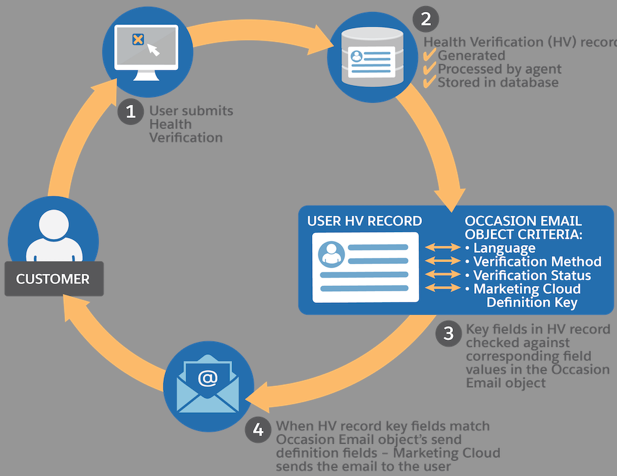
Here’s how it works at run time.
- A user submits their Health Verification form on your site.
- The system generates and stores a Health Verification record for the
user.
An agent can begin working on the verification request.
- The Health Verification record includes data about selections that the user
made when submitting the form. The Health Verification record also includes
status information based on any work the agent has done processing the
request.
Each Occasion Email Mapping that is configured in Health Verification email maps to an Engagement Send Definition.
- When data from the Health Verification record matches the configuration criteria from the Occasion Email Mapping object, Engagement sends an email.
This table lists and defines the Occasion Email Mapping fields.
| Field | Definition |
|---|---|
| Occasion | Related Occasion Record |
| Verification Method | Method the Health Verification record requires to trigger the email. |
| Verification Status | Status the Health Verification record requires to trigger the email. |
| Marketing Cloud Definition Key | Name of the Send Definition Key for the journey in Engagement. |
| Verification Site URL | Optional parameter that can be passed to Engagement and used within the Email template to link users back to the org. |
| Language | Form language |
| Email Template Header Name | Name of the Classic Email template that can be used as HTML content for the header in the Engagement template.
|
| Email Template Body Name | Name of the Classic Email template that can be used as HTML content for the body in the Engagement template
|
| Email Template Footer Name | Name of the Classic Email template that can be used as HTML content for the footer in the Engagement template.
|
The Occasion Email Mapping object serves as a bridge for Classic HTML templates, which is an out-of-the-box feature, and the Engagement Email template. It specifies the Engagement Email template (Definition Key), and the Classic HTML email header, footer, and body.
Safety Cloud uses the template to pass content into the Engagement Email, which is eventually sent to the scheduled batch job to the related person account records.
Use the Occasion Email Mapping object to create the mappings between classic email templates and Engagement emails decoratively, as described here.
- From the App Launcher, type Occasion Email Mappings, and then select Occasion Email Mappings.
-
Select a preconfigured mapping.
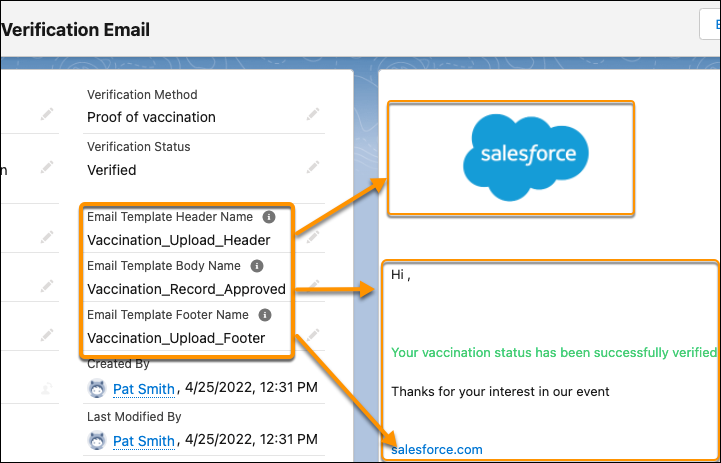
The values specified in the Email Template Header Name, Email Template Body Name, and Email template Footer Name fields reference the API names of Salesforce Classic Email templates.
The Engagement Definition Key serves as the reference ID that connects the Salesforce Org and its related Engagement journey. The content is passed to the email in Engagement and Engagement sends the email to the person who’s health status is verified.
